

InfoSec Advisory with Del Aden:
Security on the web is more important than ever. With new vulnerabilities and data breaches being reported on a daily basis, it is crucial for us to do a better job of securing the stuff that we make so that we can protect users from various attacks.
Every year technology gets better, and every year hackers find a way around the newest forms of security. So, security gets updated and continues to work until it’s hacked again, and the cycle continues. That’s why it’s so important to keep your website up to date and reduce the chances of it being compromised.
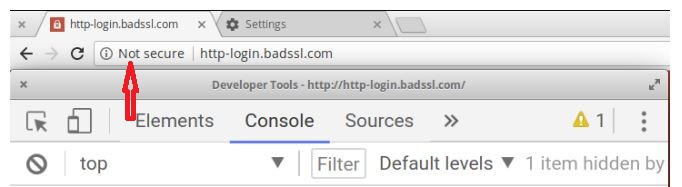
Why No Padlock? – What does it mean if a website doesn’t have a padlock?
If the address-bar of a website does not show a padlock, you may not be communicating with the intended website and your data isn’t safe against eavesdropping! Warning: You should never send any sensitive information (such as bank information, credit card data or social security numbers) to a website if the address-bar does not show a grey or green padlock. In such cases, you may not be communicating with the intended website and your data isn’t safe against eavesdropping!
Why am I seeing a ‘Not Secure’ warning?
The reason you are seeing the ‘Not Secure’ warning is because the web page or website you are visiting is not providing a secure connection. When your browser connects to a website it can either use the HTTP (insecure) or HTTPS (secure). Any page providing an HTTP connection will cause the ‘Not Secure’ warning to show.
Browsers (such as Chrome and Firefox) are warning users not to use insecure webpages. These Browsers are actively discouraging users from using webpages served insecurely. For example, Chrome (v62 and later) shows a security warning when users try to enter data on a webpage that is loaded over plain HTTP.
What does the green/grey padlock mean?
In contrast, when a webpage is loaded properly over HTTPS you will see a green padlock in the address-bar. This indicates to users that any information received or sent to the website will not be compromised by a Man In The Middle – even if such exists on the network.
So, what is HTTPS?
HTTPS is a secure version of HTTP. The ‘S’ stands for Secure. It protects the authenticity and integrity of the exchanged data over a network by encrypting and decrypting the requests and responses between clients and servers. HTTPS ensures that the communications between a client (such as a web browser) and a server is encrypted and cannot be intercepted by a Man In The Middle (MITM) attack.